# Assets

An `Assets` is a generic descriptor for a collection of [Assets Versions](https://docs.msquared.io/apis-and-tooling/dashboard/assets/assets-versions). Assets are the primary method for sharing self-contained UE content bundles that users can obtain and utilize.

{% hint style="info" %} <mark style="color:blue;">The term “Assets” refers both to an individual collection of versions and to multiple collections.</mark>
{% endhint %}

All Assets and Assets Version are created, packaged and uploaded from MSquared editors (including [releases](https://docs.msquared.io/apis-and-tooling/dashboard/releases)). All Assets and Assets Versions can be managed from the dashboard by anyone with premissions and all Assets and Assets Versions are ingested by end users via the [MSquared Launcher](https://docs.msquared.io/apis-and-tooling/launcher/msquared-launcher).

{% hint style="warning" %} <mark style="color:orange;">It is up to the Assets Author to ensure the Assets adequately describes the content. We do not enforce that tags, names, descriptions or media are accurate or even that two Assets Versions within the same Assets are similar.</mark>
{% endhint %}

## Assets Types

Assets come in 3 distinct forms for different purposes. Each `Assets Type` is uploaded, managed and consumed differently.

Follow the links below to find guides and read more about each type:

* [Engine Plugins](https://docs.msquared.io/apis-and-tooling/dashboard/assets/engine-plugins) - Assets that are bundled with MSquared Editors to form [Releases](https://docs.msquared.io/apis-and-tooling/dashboard/releases).
* [Project Plugins](https://docs.msquared.io/apis-and-tooling/dashboard/assets/project-plugins) - Assets that can be added or removed from a users project at any point.
* [Templates](https://docs.msquared.io/apis-and-tooling/dashboard/assets/templates) - Assets that are selected during project creation to provide a base set of content

## Assets editable information

<table><thead><tr><th width="194">Field Name (*Required)</th><th>Description</th></tr></thead><tbody><tr><td>Name*</td><td>The name given to your Assets. This is displayed to users when searching for your Assets, managing Assets installations and managing creating Releases.</td></tr><tr><td>Description</td><td>A <code>markdown</code> description for what your Assets contain and do. Users will use this when determining if your Assets are suitable for their purposes.<br><br>As this is a markdown field, users can preview what their markdown will look like and are able to embed media into it the description via links.</td></tr><tr><td>Tags</td><td>Tags allow users to more easily search for your assets via filtering and search and provide quickly parsable information about the content contained.<br><br>Tags can be any string and only a maximum of 20 tags may be applied to an assets.</td></tr><tr><td>Picture</td><td>The primary display image for your Assets.</td></tr><tr><td>Extra Media</td><td>Additional images or videos.</td></tr></tbody></table>

## Draft Assets

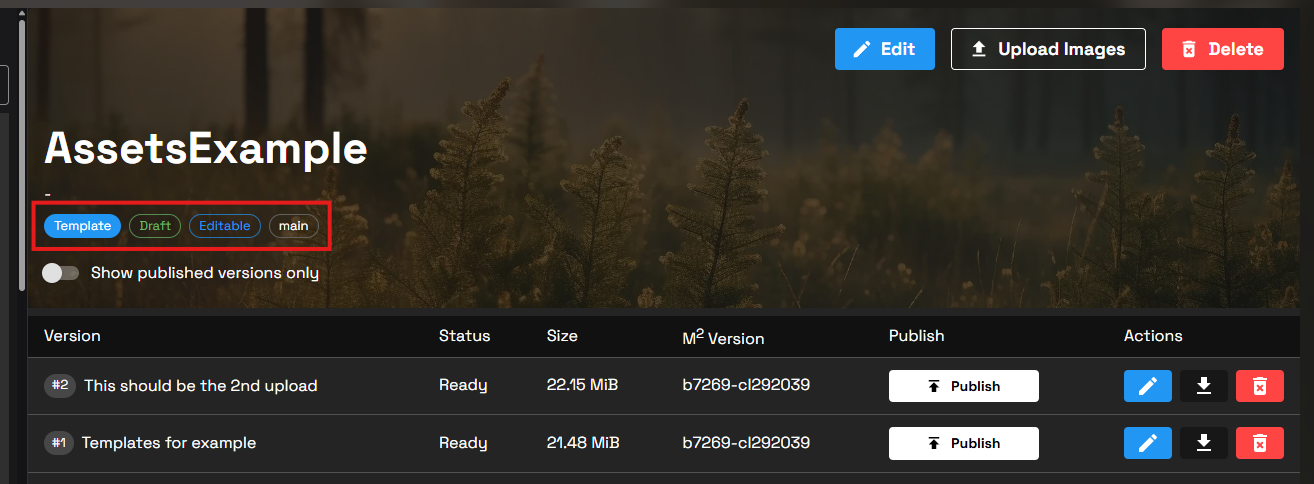
Assets are initially `Draft` assets. This means that they can be deleted freely and users are unable to see them in the [plugins page of the launcher](https://docs.msquared.io/apis-and-tooling/launcher/msquared-launcher/plugins).

{% hint style="info" %} <mark style="color:blue;">You can check whether your Assets is a draft by checking the tags in the Assets header</mark>
{% endhint %}

<figure><img src="https://1456550285-files.gitbook.io/~/files/v0/b/gitbook-x-prod.appspot.com/o/spaces%2FoWTlPaoHd1McSakqMigu%2Fuploads%2Fgit-blob-af7f011426874e4a12d747c071e13eb15b108d7c%2Fimage.png?alt=media" alt=""><figcaption></figcaption></figure>

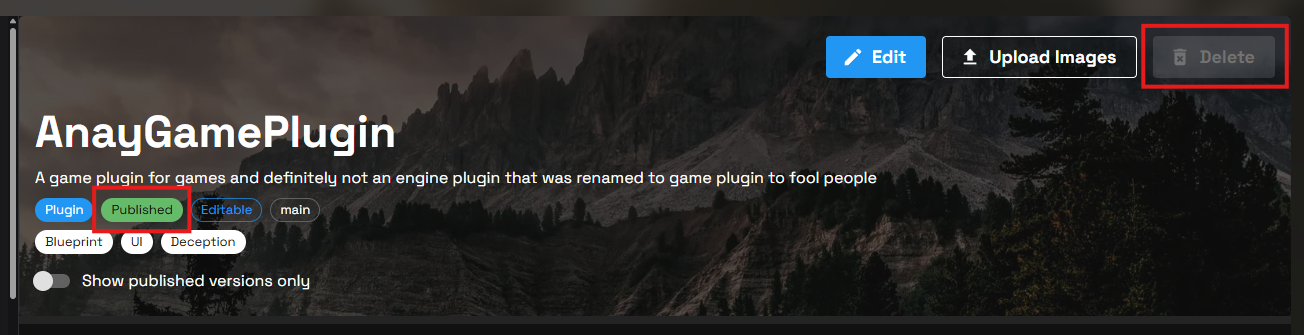
{% hint style="warning" %} <mark style="color:orange;">Once any Assets Version within an Assets has been</mark> [<mark style="color:orange;">published</mark>](https://docs.msquared.io/apis-and-tooling/dashboard/assets-versions#publishing-assets-versions)<mark style="color:orange;">, the Assets becomes</mark> <mark style="color:orange;">`Published`</mark> <mark style="color:orange;">and can no longer be deleted.</mark>
{% endhint %}

<figure><img src="https://1456550285-files.gitbook.io/~/files/v0/b/gitbook-x-prod.appspot.com/o/spaces%2FoWTlPaoHd1McSakqMigu%2Fuploads%2Fgit-blob-0b70e90c65cd658109b7755c08fcbf85197195a0%2Fimage.png?alt=media" alt=""><figcaption></figcaption></figure>

## Terminology

<table><thead><tr><th width="178">Term</th><th>Description</th></tr></thead><tbody><tr><td>Author</td><td>The creator and/or maintainer of an Assets. This is strictly anyone with permissions to edit an Assets.</td></tr><tr><td>User</td><td>The consumer of an Assets.</td></tr><tr><td>Assets Type</td><td>Whether the Assets is an engine plugin, project plugin or a template.</td></tr></tbody></table>

## Limitations

* We do not allow Assets to be deleted if they contain one or more [published Assets Versions](https://docs.msquared.io/apis-and-tooling/dashboard/assets-versions#publishing-assets-versions).

## Guides

<details>

<summary>Creating Assets</summary>

Creating a new Assets will happen automatically when you perform the initial Assets upload.

{% hint style="info" %} <mark style="color:blue;">The process involved in creating an Assets is dependent on the</mark> <mark style="color:blue;">`Assets Type`</mark>\ <mark style="color:blue;">being created.</mark>
{% endhint %}

* [Creating a new Engine Plugin Assets](https://docs.msquared.io/apis-and-tooling/dashboard/engine-plugins#create-a-new-engine-plugin-assets).
* [Creating a new Project Plugin Assets](https://docs.msquared.io/apis-and-tooling/dashboard/project-plugins#create-a-new-project-plugin-assets).
* [Creating a new Template Assets](https://docs.msquared.io/apis-and-tooling/dashboard/templates#create-a-new-template-assets).

</details>

<details>

<summary>Editing Assets</summary>

{% hint style="info" %} <mark style="color:blue;">The Assets editing process is the same for all Assets Types.</mark>
{% endhint %}

1. Navigate to the Assets you would like to edit.
2. Click the `Edit` button on the Assets header.\
   \
   ![](https://1456550285-files.gitbook.io/~/files/v0/b/gitbook-x-prod.appspot.com/o/spaces%2FoWTlPaoHd1McSakqMigu%2Fuploads%2Fgit-blob-1a3f6a1bccf1b9263f27a53a69f48bb4e23474d5%2Fimage.png?alt=media)\\
3. Perform edits in the opened modal.
4. Click `Save`.\
   \
   ![](https://1456550285-files.gitbook.io/~/files/v0/b/gitbook-x-prod.appspot.com/o/spaces%2FoWTlPaoHd1McSakqMigu%2Fuploads%2Fgit-blob-a5c3e613675cf98a4bc2716e944f17e5584e55c5%2Fimage.png?alt=media)\\
5. Click the `Upload Images` button on the Assets header.
6. Modify or add new images using the `Change Assets Image` and `Add additional images` buttons.\
   \
   ![](https://1456550285-files.gitbook.io/~/files/v0/b/gitbook-x-prod.appspot.com/o/spaces%2FoWTlPaoHd1McSakqMigu%2Fuploads%2Fgit-blob-9f86af85cc811a88fd716d4f682bee2b4af194c7%2Fimage.png?alt=media)\\
7. Click `Save`.

</details>

<details>

<summary>Deleting Assets</summary>

{% hint style="info" %} <mark style="color:blue;">The process for deleting an Assets is the same for all Assets Types</mark>
{% endhint %}

1. Navigate to the Assets you want to delete.\
   \
   ![](https://1456550285-files.gitbook.io/~/files/v0/b/gitbook-x-prod.appspot.com/o/spaces%2FoWTlPaoHd1McSakqMigu%2Fuploads%2Fgit-blob-d6b9eb9581a417d8b5fa35a5a832aa00335e4a34%2Fimage.png?alt=media)\\
2. Click the `Delete` button in the Assets header.
3. Confirm the deletion by clicking `Delete` again in the modal.\
   \
   ![](https://1456550285-files.gitbook.io/~/files/v0/b/gitbook-x-prod.appspot.com/o/spaces%2FoWTlPaoHd1McSakqMigu%2Fuploads%2Fgit-blob-727bb1a2256b768c0592b2bba6e2a5ace915ba63%2Fimage.png?alt=media)

</details>