> For the complete documentation index, see [llms.txt](https://docs.msquared.io/llms.txt). Markdown versions of documentation pages are available by appending `.md` to page URLs; this page is available as [Markdown](https://docs.msquared.io/creation/unreal-development/features-and-tutorials/spawning-and-respawning.md).
# Spawning and respawning
The Morpheus platform has some helper functionality to control where players spawn into the world, which can be especially useful in experiences with large numbers of players.
### J\_PlayerStartVolume
You can use `J_PlayerStartVolume` actors to automatically create multiple player start actors. Set the EQ query to control the layout of the start actors. By default it will create `PlayerStart` actors but you can select any subclass to spawn instead, for example to support a team game with different spawn point classes for each team.
### Customising the spawning behavior
By default all `PlayerStart` actors in the level are shuffled into a random order, and each new player spawn will use the next one in the list, cycling through.
You can completely replace this behavior by overriding `M2_GameMode::M2ChoosePlayerStart` to add any custom logic:
### Preferred start volumes
If you don't want to completely replace the spawning behavior, the default `M2_GameMode` behaviour supports "preferred start volumes". You can call `M2_GameMode::SetPreferredPlayerStartVolumes` to restrict spawning to the start points of specific start volumes.
For example in a live narrative event, you may wish late joining players to spawn (or respawn) in the currently active part of the level. Call this on the server to affect the spawn position of all subsequent joiners.
### Respawning
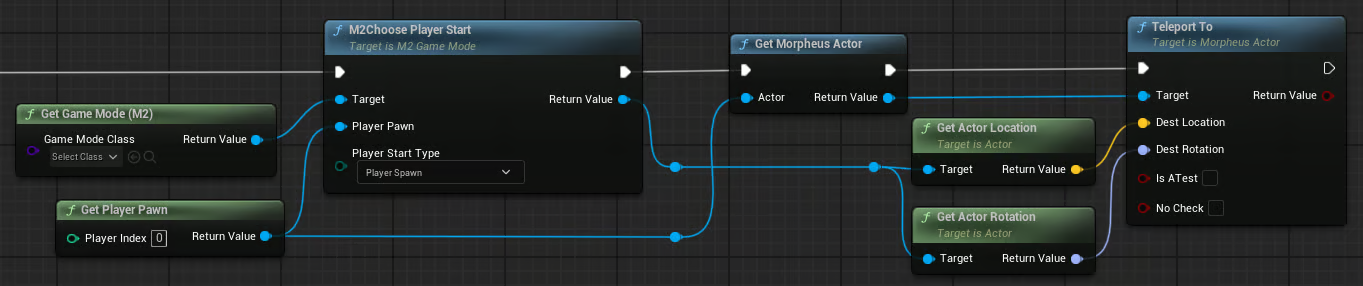
The base Morpheus character classes don't have a built-in respawn function, but it is easy to implement in Blueprint by simply finding a start point and teleporting the player. To respawn using the same logic as if the player has left and re-joined you could use this: