> For the complete documentation index, see [llms.txt](https://docs.msquared.io/llms.txt). Markdown versions of documentation pages are available by appending `.md` to page URLs; this page is available as [Markdown](https://docs.msquared.io/creation/unreal-development/features-and-tutorials/asset-loader.md).
# Asset Loader
{% hint style="success" %}
verified: 2025-12-04 version: v39
{% endhint %}
For larger maps, loading times and memory usage can be an issue if every asset is hard referenced. This can be reduced by loading assets asynchronously on demand from Soft Object References.
The Morpheus platform provides a set of asset loading functions which wrap some of the boilerplate of the vanilla Unreal loading functions. They also cache recently loaded assets, which can reduce micro-stalls when rapidly loading and unloading assets, and provide consistent execution flow behaviour by ensuring that all latent nodes are executed later in the frame after the function has exited (instead of potentially executing instantly if the asset is already available).
## Blueprint nodes
These are latent asynchronous nodes, so can only be used in the Event graph (not in functions).
### Standard assets
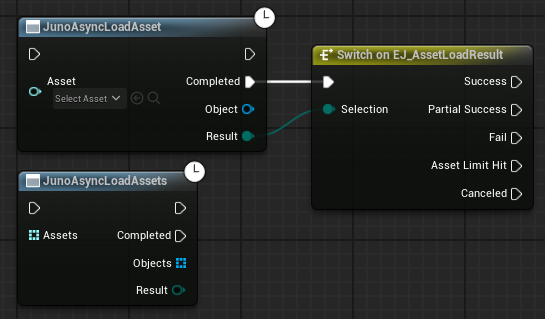
Use the `JunoAsyncLoadAsset` or `JunoAsyncLoadAssets` nodes to load one or more Soft Object references. The `Completed` pin is executed once the load completes, and the result can be checked. For `JunoAsyncLoadAssets` the loaded `Objects` array is guaranteed to be in the same order as the input `Assets` array - the indexes will match, even if some assets fail to load.
You will need to cast the loaded object to the expected type on completion.
Assets don't need explicitly unloading. Once the last reference to the returned object has been cleared, the asset can be garbage collected once the cache timeout has expired.
### Load results
* Success - All assets loaded successfully
* Partial Success - When loading an array of assets, at least one of them loaded successfully
* Fail - None of the assets loaded successfully
* Asset Limit Hit - By default there are no limits, so this won't occur
* Canceled - Asset loads cannot be cancelled from Blueprint, so this should only occur during e.g. a level transition
### Classes
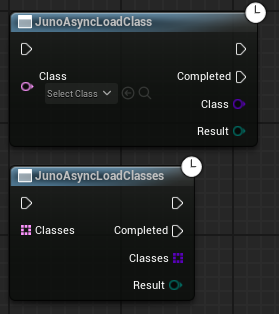
Equivalent functions exist for loading classes from Soft Class References.
### Primary assets
Primary assets can be loaded in a similar way, but also return a `Keep Loaded Handle`. This is to simplify the vanilla load functions, and remove the need to explicitly call an Unload function.
To keep the Primary Assets loaded you keep a reference to the loaded objects themselves as normal, or you can keep a copy of the returned handle. Clear the handle again to enable the objects to be garbage collected. When using `JunoLoadPrimaryAssetList` the single handle will keep all assets loaded.
You can also ignore the `Keep Loaded Handle`, and just rely on holding onto references to the loaded objects.
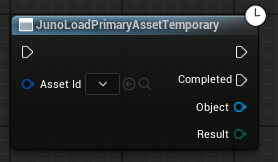
Alternatively you can call `JunoLoadPrimaryAssetTemporary` which behaves exactly like `JunoAsyncLoadAsset`:
.png?alt=media)